
Invoices
How invoices arrive from Google Drive and how they're scoped to your org.
AdminOperator
Updated 2026-06-04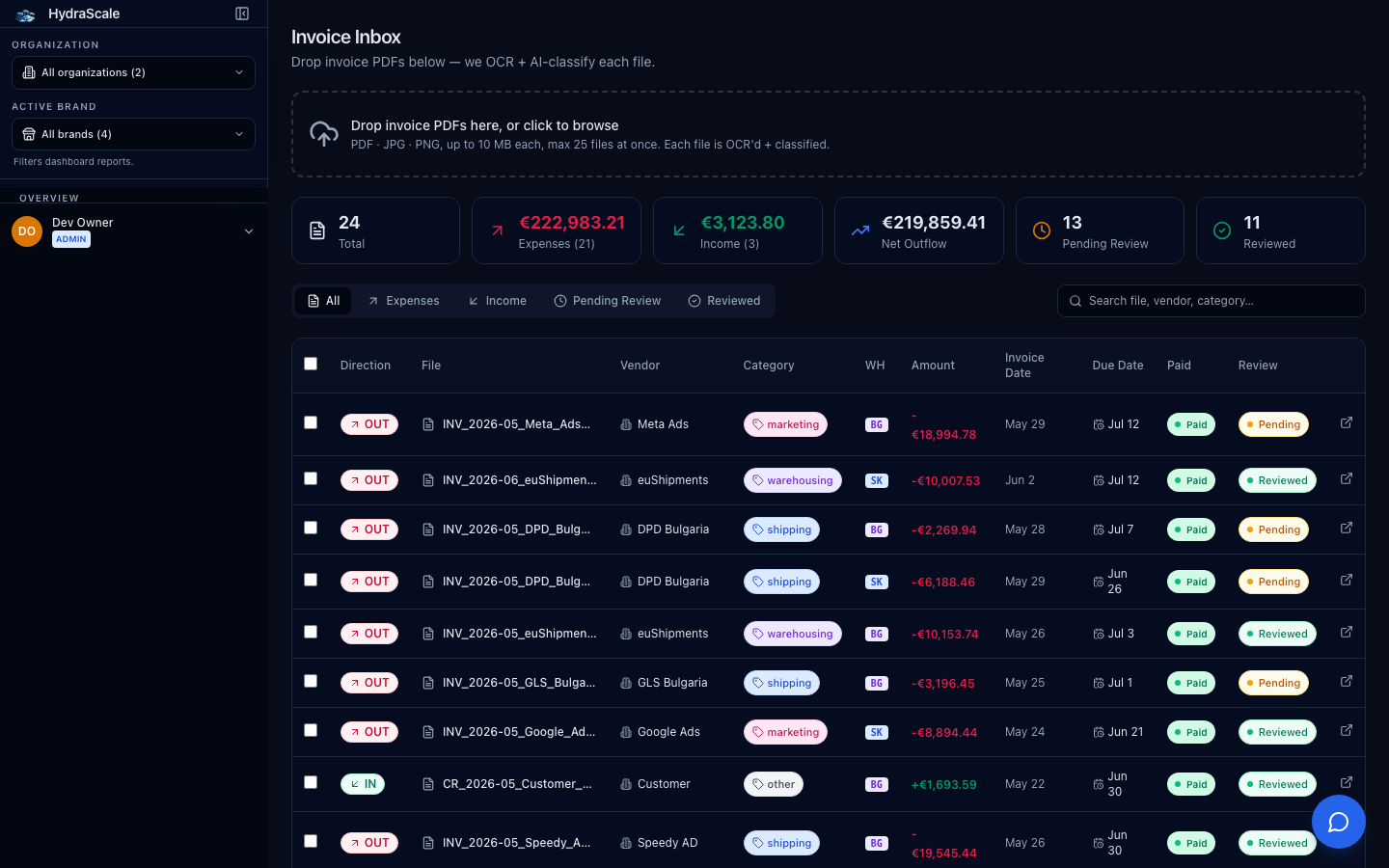
Pulled in, parsed, then confirmed
Invoices sync daily from a connected Google Drive folder, and AI parses each one into structured fields. They land as 'Pending Review' until a human confirms them — 'Reviewed' means you've checked the parse. The list is always scoped to your org; you never see another tenant's documents.
Filters
- Direction (All / Expenses / Income)
- Split supplier/shipping costs from incoming revenue. The header's Net Outflow nets the two.
- Status (Pending Review / Reviewed / Paid)
- Work the unreviewed queue, or find what's confirmed and what's been paid.
- Search
- Find an invoice by file name, vendor, or category.
Reviewing an invoice
- Review → Edit Invoice
- Open the AI-parsed record and correct any field — Supplier name, Amount, Category, Direction, Invoice Date, Due Date — then confirm it.
- Parsed Data (raw)
- See exactly what the AI extracted from the document, for spot-checking a tricky scan.
- Select all visible / Clear selection
- Batch-act on a filtered set of invoices at once.