
Reading the dashboard
What each headline card means and how the time and store filters reshape every number on the page.
AdminOperator
Updated 2026-06-04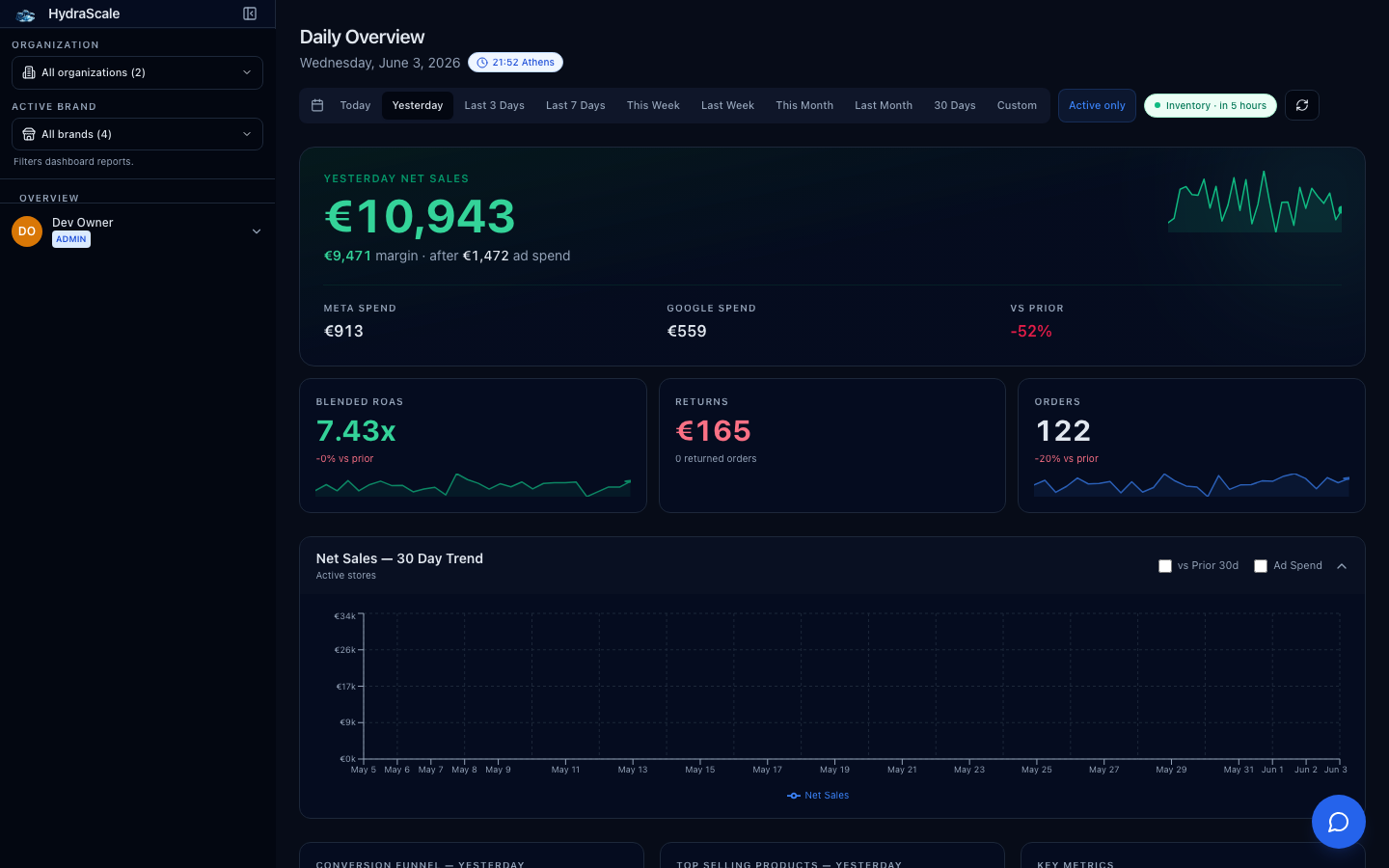
What the dashboard shows
The dashboard is the one-tab P&L. Every card is reconciled in EUR: Shopify sales (shop currency converted), Meta and Google ad spend (per-account currency converted), refunds, margin, and the fulfilment funnel. There is no manual data entry — the numbers come from the syncs that run every few hours.
- Net sales, ad spend, and margin in the headline row
- ROAS computed as net sales ÷ ad spend (never spend-weighted)
- Fulfilment snapshot: pending, in-transit, delivered, stuck
The headline cards
The top row is your P&L at a glance. Each card follows the date range you pick (except current-state counts like stock and pending shipments).
- Revenue
- Net sales in EUR across the selected stores and window — Shopify orders minus refunds, shop currency converted.
- Ad Spend (Meta + Google)
- Direct-API spend in EUR, broken into Meta Spend and Google Spend. Triple Whale blended is never used for these per-platform numbers.
- ROAS (Meta ROAS / Google ROAS)
- Net sales ÷ ad spend, shown per platform. Platform ROAS values are never spend-weighted into a single blended figure.
- Orders · Clicks · Impressions
- Volume counters for the window, so you can sanity-check revenue against traffic.
Filters & panels
- Date range
- Presets — Today, Yesterday, Last 3 Days, This Week, Last Week, This Month, Last Month, 30 Days — plus Custom for an exact span. Reshapes every flow metric; current-state counts ignore it.
- Organization switcherAdmin
- Tenant owners in more than one organization switch the active org or view the cross-org aggregate. Single-org members don't see this.
- Brand / store filter
- Narrows the dashboard to one store or brand. It can only narrow to stores you already have access to — it never widens scope.
- Alerts panel
- Surfaces open Critical anomalies inline (or 'All clear'). A shortcut into the Anomalies queue without leaving the dashboard.
- Fulfilment & Returns panel
- A live snapshot of the shipment funnel and returns so operators see fulfilment health beside the money.