
Customers
Reading LTV and segments, and why some actions are admin-only.
AdminOperator
Updated 2026-06-04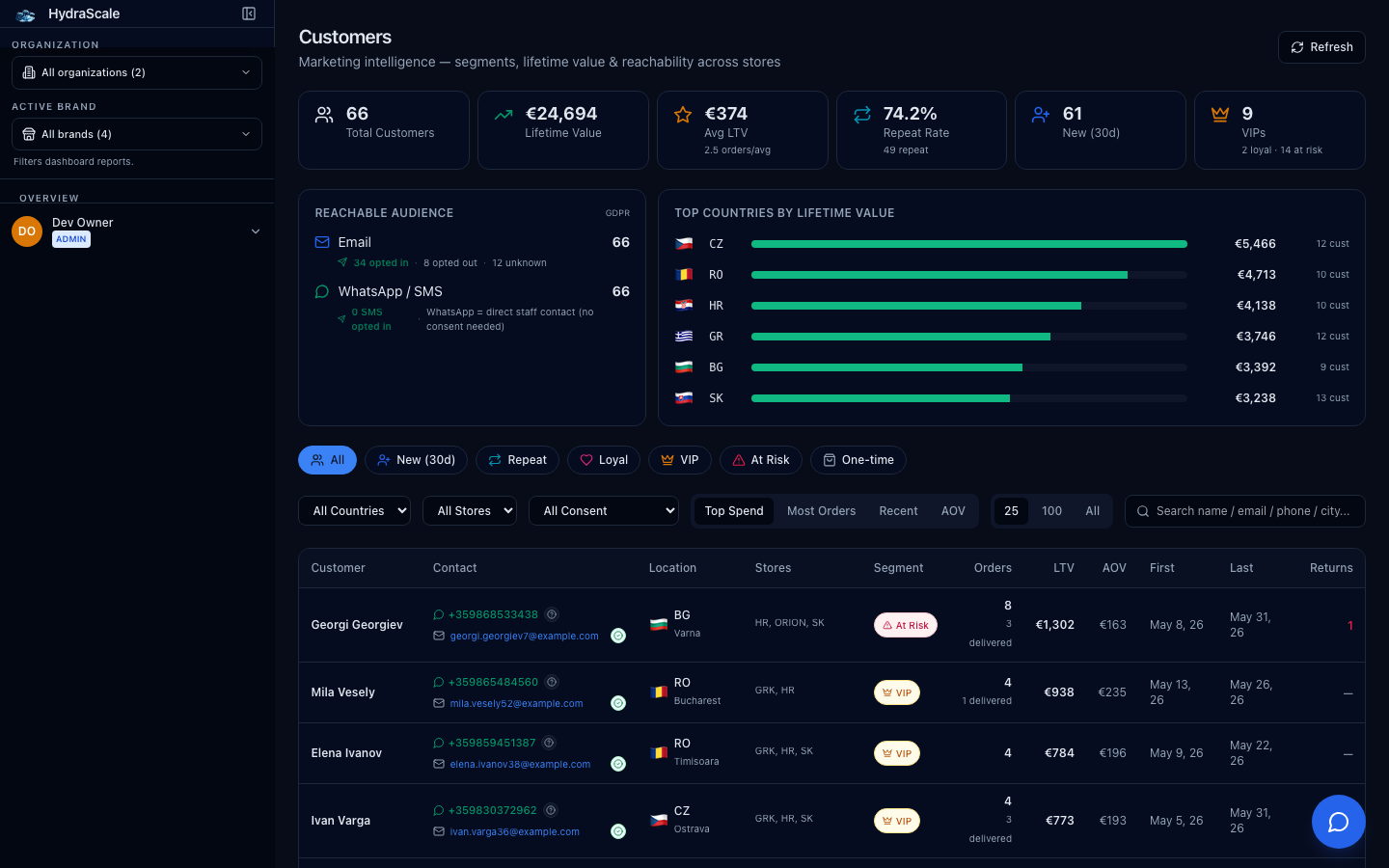
Who your buyers are
The customer list rolls up lifetime value, order count, brands shopped, and a segment for each buyer. Someone who shops more than one of your brands appears under each. Columns include LTV, AOV, Orders, Returns, Segment, Stores and Location.
Filters
- Segment (VIP / Loyal / Repeat / New (30d) / At Risk / One-time)
- Slice by Brevo segment — find VIPs to reward or At-Risk buyers to win back. These mirror the lists sync-brevo maintains.
- Consent (All / Opted In)
- Filter by marketing-consent state. Only 'Opted In' customers are legally safe to send marketing to — the page says so inline.
- Store / Country
- Scope the list to one store or market (All Stores / All Countries by default).
- Search
- Look up a customer by name, email, phone, or city.
What each role can do
- View the listAdminOperator
- Operators and admins can read customers, LTV and segments.
- Mutate / push segmentsAdmin
- Editing customer data or pushing segment changes to Brevo is admin-only.